
Unlike Employer Opportunities, which represent a potential contract with a specific employer, Broker Opportunities should be treated as ongoing referral relationships. Brokers typically work with multiple employers and may bring new opportunities to your practice over time.
Tracking broker relationships helps your team:
-
Maintain visibility into broker partnerships
-
Track which employers are associated with each broker
-
Identify the primary contacts at brokerage firms
-
Record discovery notes and relationship history
Broker Opportunities act as a parent relationship that can be connected to multiple Employer Opportunities.
Broker Opportunity Layout
When you open a Broker Opportunity, you will see a sidebar with broker details and several tabs used to manage the relationship.
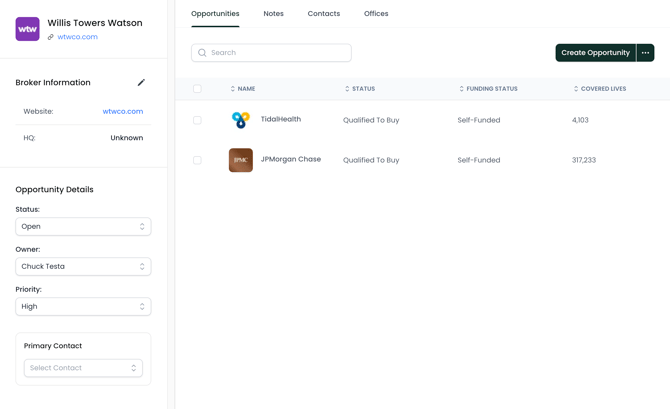
Broker Information
This section contains basic details about the brokerage firm:
-
Company name
-
Website
-
Headquarters location
To update this information, click the pencil icon in the sidebar to open the editing panel.
Opportunity Details
Opportunity Details track internal ownership and relationship status. Key fields include:
Status
Broker relationships are typically long-term, so most broker opportunities will remain Open rather than moving through traditional sales stages.
Owner
The team member responsible for managing the relationship with the brokerage.
Priority
An internal indicator used to highlight brokers that may provide high-value employer introductions.
Primary Contact
The main contact at the brokerage firm.
Associated Employer Opportunities
The main panel shows Employer Opportunities connected to this broker.
This allows you to quickly see which employers are associated with a broker relationship.
From this section you can:
-
View employer opportunities tied to the broker
-
Create a new employer opportunity connected to the broker
If you want to associate an existing employer opportunity with a broker, you can open the employer opportunity and select the appropriate brokerage under Broker Information. For more information on Employer Opportunities, review this article.
Notes
The Notes section allows you to capture important details about conversations with the broker.
Examples include:
-
Discovery discussions
-
Upcoming employer introductions
-
Internal reminders for follow-up
Keeping notes updated helps your team maintain continuity when working with brokers.
Contacts
The Contacts tab lists people associated with the brokerage firm.
Contacts typically include:
-
Benefits consultants
-
Account managers
-
Producer relationships
-
Referral connections
To add a new contact, click Create Contact and enter the individual’s details, including their role, job title, and contact information.
Offices
The Offices section shows the geographic locations associated with employer opportunities tied to the broker. This view helps your team understand where a broker’s employer relationships are located geographically.
Best Practices
To manage broker relationships effectively:
-
Assign a clear Owner for each broker relationship
-
Maintain Contacts for key broker stakeholders
-
Track employer introductions by associating employer opportunities
-
Use Notes to document conversations and partnership activity