
In simple terms, concurrency rules determine whether appointments can be double booked or stacked within a schedule.
These rules help clinics manage scheduling flexibility while maintaining appropriate provider workload.
Understanding Concurrency
Concurrency refers to how many appointments are allowed to occur during the same time window.
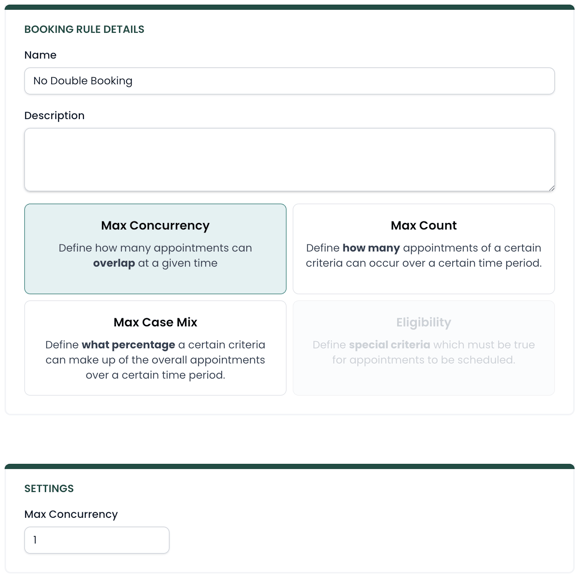
For example:
-
A concurrency limit of 1 means no appointments can overlap.
-
A concurrency limit of 2 allows double booking.
-
A concurrency limit of 3 allows triple booking.
If the number of overlapping appointments would exceed the rule, the system will prevent the appointment from being scheduled.
Common Use Cases
Concurrency rules are often used to support operational scheduling policies like:
Preventing double booking
Many clinics want to ensure that providers are only seeing one patient at a time.
In this case, the rule would set the maximum concurrency to 1.
Allowing controlled double booking
Some clinics allow double booking under certain circumstances, such as:
-
Overlapping follow-up visits
-
Overlapping assistant or tech supported visits
In these cases, concurrency can be increased to allow additional overlapping appointments.
Restricting overlap for specific visit types
Concurrency rules can also be targeted to specific services or patient types using scopes.
For example, a clinic might want to prevent double booking for initial evaluations, even if other visits can overlap.
Applying Concurrency Rules
When creating a concurrency rule, you define the maximum number of appointments that can overlap.
Once the rule is active, the scheduling system will check this rule whenever availability is shown for a new appointment.
If adding the appointment would exceed the concurrency limit, booking will not be allowed for that slot.
Using Scopes with Concurrency
Concurrency rules become more powerful when combined with scopes.
Scopes allow you to apply the rule to specific conditions such as:
-
A specific provider
-
A clinic location
-
A particular service
-
A payer or insurance group
For example, you could create a rule that prevents double booking for:
-
Medicare patients
-
Initial evaluations
-
At a specific clinic location
Scopes allow you to control scheduling policies with much greater precision.
Advanced Settings
All booking rules contain two advanced settings called Skip and Valid Until. Read more on how those are used in this article.