
Instead of simply marking a lead as Closed Lost, selecting a reason provides useful insight into what prevented the patient from moving forward.
Over time, this information helps your organization identify common barriers to scheduling, such as insurance coverage, cost concerns, or patient preference.
How Closed Lost Reasons Work
When a lead is moved to Closed Lost on the Lead Dashboard, the system will immediately display a pop-up asking the user to select a reason.
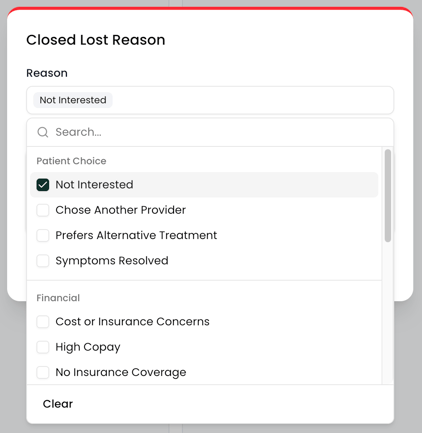
The user will choose:
-
A Closed Lost Reason
-
An optional note with additional context
Selecting a reason ensures your team consistently tracks why leads are not converting.
Reason Categories
Closed Lost Reasons are grouped into categories to make them easier to manage and report on. Categories also make it easier for staff to quickly find the appropriate reason when closing a lead.
Common categories include:
Patient Choice
Examples: Not Interested, Chose Another Provider, Prefers Alternative Treatment
Financial
Examples: Cost or Insurance Concerns, High Copay, No Insurance Coverage
Medical
Examples: Not Medically Necessary, Needs Different Provider
Logistical
Examples: Location Not Convenient, Scheduling Conflict
Managing Closed Lost Reasons
Closed Lost Reasons can be created and managed in Settings > Leads > Closed Lost Reasons.
From this page, administrators can:
-
Create new reasons
-
Assign them to categories
-
Edit or remove existing reasons
Keeping reasons organized and clearly defined helps ensure your team records lost leads consistently and makes reporting more meaningful.