
Unlike concurrency rules, which control overlapping appointments, count rules control the total number of occurrences of a specific visit type.
These rules help clinics manage provider workload and ensure that certain appointment types do not dominate the schedule.
How Count Rules Work
Count rules track the number of times a specific type of appointment has been scheduled within a defined timeframe.
When the maximum count is reached, the system prevents additional appointments of that type from being scheduled during that period.
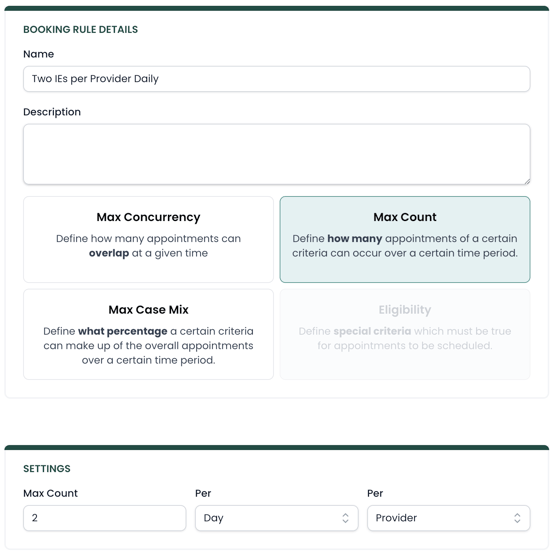
When creating a count rule, you define:
-
Max count: the number of appointments allowed
-
Time period: per day or per week
-
Target: where the rule applies (per location or provider)
Common Use Cases
Count rules are often used to maintain balance in provider schedules.
Examples include:
Limiting evaluations per day
Many clinics limit how many initial evaluations a provider performs each day. This ensures providers have time for follow-up care and documentation.
Example rule: Maximum 2 evaluations per provider per day
Limiting free screens
Some clinics offer free injury screens but want to control how many occur within a given timeframe. This helps prevent free screens from consuming too much provider time.
Example rule: Maximum 5 free screens per week
Managing specialty services
Clinics may also use count rules to limit certain specialty services if provider capacity is limited.
Applying Count Rules
When an appointment request is being created, the system checks how many slots matching the rule have already been booked within the specified time period.
If the maximum count has been reached, the availability will not be shown.
This helps ensure that scheduling policies are applied consistently without requiring staff to manually monitor provider schedules or move visits after they've been booked.
Using Scopes with Count Rules
Like other booking rules, count rules can be targeted using scopes.
Scopes allow you to apply the rule to specific parts of your organization, such as:
-
A particular provider
-
A specific clinic location
-
A certain service type
-
A payer or insurance group
Combining count rules with scopes allows clinics to create precise scheduling policies that match operational needs.
Advanced Settings
All booking rules contain two advanced settings called Skip and Valid Until. Read more on how those are used in this article.