
The Deliverability tab (Analysis → Deliverability) shows how your emails perform by mailbox provider (Gmail, Outlook, Yahoo, etc.) across a selected date range.
This view aggregates all outbound email and helps you identify where deliverability or engagement may be weakening at the provider level.
What You’re Looking At
Each row represents a mailbox provider (or provider group).
-
Outbound shows the percentage of total email volume sent to that provider (adds up to 100%).
-
All other metrics (Delivery, Bounce, Open, Click, Spam) are calculated within that provider — not across your total sends.
Example: If 60% of your outbound email goes to Gmail and Delivery shows 99%, that means 99% of emails sent to Gmail were delivered.
Color Coding
Metrics are color-coded to flag risk levels:
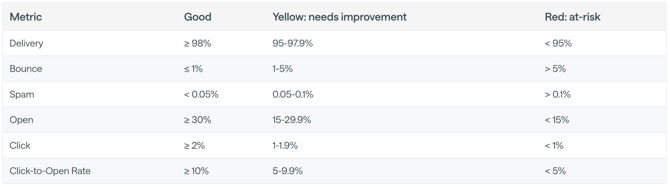
-
Red = At risk. Actively harming sender reputation.
-
Yellow = Needs improvement. Trending toward problems.
-
No highlight = Within healthy range.
Refer to the table above for threshold details.
If You See a Problem, Start Here
High Bounce Rate
What it means: You’re sending to invalid or outdated email addresses.
What to do:
-
Remove hard bounces immediately.
-
Suppress contacts who haven’t engaged in 6–12 months.
-
Audit how contacts are entering your system (forms, imports, integrations).
-
Avoid purchasing or bulk importing old lists.
Bounce rate is a list quality problem — not a messaging problem.
High Spam Complaint Rate
What it means: People didn’t expect your email or found it irrelevant.
What to do:
-
Reduce send frequency.
-
Tighten segmentation — send more relevant content.
-
Make sure opt-in language is clear.
-
Consider suppressing chronically unengaged users.
Spam complaints damage reputation faster than almost anything else.
Low Delivery Rate
What it means: Mailbox providers are filtering or blocking your emails.
What to do:
-
Confirm SPF, DKIM, and DMARC are properly configured.
-
Pause sends to cold or unengaged segments.
-
Gradually warm back up with engaged recipients first.
-
Reduce volume spikes.
Low delivery is usually a reputation or authentication issue.
Low Open Rate (with strong delivery)
What it means: People are receiving emails but not engaging.
What to do:
-
Improve subject lines.
-
Test send times.
-
Refine targeting and personalization.
-
Suppress unengaged contacts.
Low opens are typically a relevance problem.
Low Click Rate or Low Click-to-Open Rate
What it means: People open your emails but don’t take action.
What to do:
-
Simplify the email — one clear CTA.
-
Move your primary CTA higher.
-
Reduce competing links.
-
Strengthen the value proposition.
This is usually a messaging clarity issue.