
Any time you identify a company that may be a good fit for direct contracting, you can create an opportunity to track the relationship, document conversations, and monitor progress toward a partnership.
Employer opportunities allow your team to:
-
Track potential employer partners in your community
-
Assign ownership of outreach and follow-up
-
Record discovery notes and relationship context
-
Identify decision makers and stakeholders
-
Monitor the status of partnership discussions
Opportunities can be created manually or generated through Discover, which pulls employer data from ZoomInfo.
If an opportunity is created through Discover, some company information will already be populated. You should always review this information for accuracy.
Employer Opportunity Layout
When you open an Employer Opportunity, you will see a sidebar with company and opportunity details, along with several tabs used to manage the relationship.
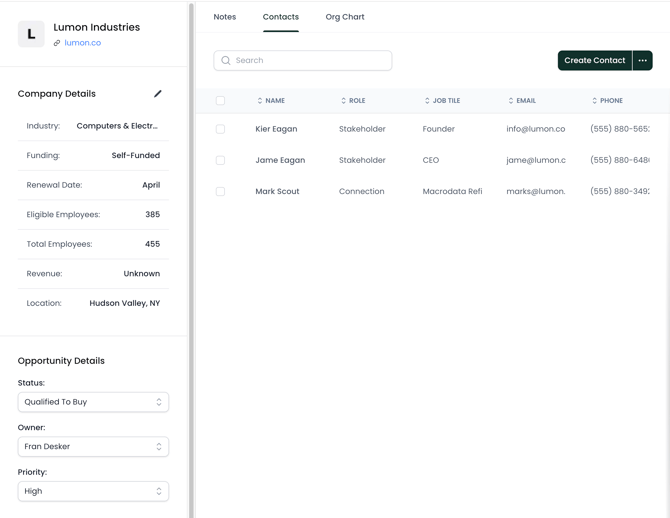
Company Information
This section contains basic information about the employer, like:
-
Company name
-
Website
-
Industry
-
Employee count
-
Location
To update this information, click the pencil icon in the sidebar to open the editing panel.
If the opportunity was created through Discover, this data comes from ZoomInfo and should be validated before outreach begins.
Opportunity Details
Opportunity Details track the internal management of the relationship. 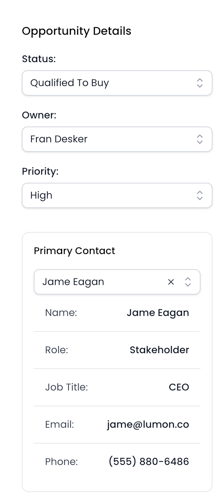
Status
Indicates the current stage of the opportunity and helps track the momentum of the relationship.
Owner
The team member responsible for managing the opportunity.
Priority
An internal indicator used to highlight high-value opportunities.
Primary Contact
The main person your team is working with at the employer.
Broker Association
If the employer works with a benefits broker, you can associate the broker with the opportunity. You can select an existing broker or create a new one.
Broker Information
This is where you track the broker associated with the Employer Opportunity. You can select from existing brokers using the dropdown—this will create an association with a Broker Opportunity.
Notes
The Notes section allows you to record important information about the opportunity.
Examples include:
-
Discovery call notes
-
Benefit discussions
-
Follow-up reminders
-
Internal observations about the relationship
Maintaining notes helps ensure your team has context when continuing conversations with the employer.
Contacts
The Contacts tab lists people associated with the employer opportunity.
Here, you should add key contacts like:
-
HR leaders
-
Benefits managers
-
Operations leaders
-
Existing connections inside the organization
To create a new contact, select Create Contact and enter:
-
Name
-
Role
-
Job title
-
Email
-
Phone
-
Description or notes
Contact Roles
Each contact can be categorized by role to help identify their influence in the decision process.
Stakeholder
A decision maker or key participant in benefits decisions, such as HR or Total Rewards leadership.
Connection
Someone your team knows at the company who may help facilitate an introduction to the appropriate decision maker.
Connections can still be valuable even if they are not directly responsible for benefits decisions.
Organization Chart
If the opportunity was created through Discover, the Org Chart tab may be available.
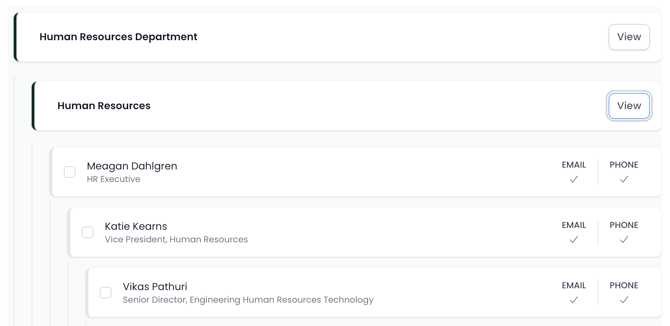
This view uses ZoomInfo data to show potential contacts within the company, including:
-
Department structure
-
Job titles
-
Reporting hierarchy
-
Available contact details
If you identify someone relevant, you can select their name and choose Get Contacts to add them to the opportunity. This uses credits to enrich the record with contact information.
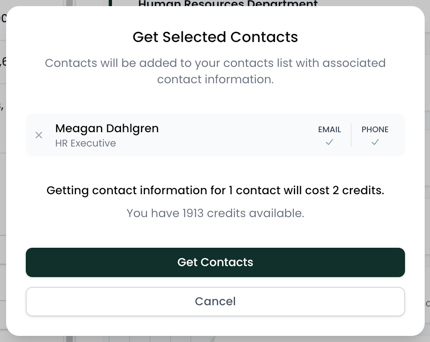
Note: at this time, Org Chart is not available for manually created opportunities.
Best Practices
To keep employer opportunities organized:
-
Assign an Owner to each opportunity
-
Update the Status as conversations progress
-
Add Notes after calls or meetings
-
Identify Stakeholders and Connections in the Contacts tab
Maintaining accurate opportunity records helps your team track employer relationships and coordinate outreach effectively.