
Automatic de-duplication
When automatic de-duplication is on, Second Door links duplicate leads for you. A linked duplicate drops off your lead dashboard and is left out of your reporting. Automatic de-duplication is on by default. You can turn it on or off for your whole practice in Settings > Task Automation.
Second Door links a new lead to an existing lead in two cases:
- The existing lead is still being worked. The existing lead has a status from your Open or In Progress status groups.
- The existing lead is closed, but the patient is still in an active course of care. The existing lead has a status from your Closed Won or Closed Lost status groups, and the patient meets the active course of care rules below.
What counts as an active course of care
The patient is in an active course of care when both of these are true:
- The patient's most recent encounter was within 14 days of the new lead, or the patient has an appointment booked within 30 days of the new lead. An encounter is a finalized note in your EMR, such as a daily note or a progress note.
- The new referral arrived within 60 days of the original lead.
If the patient doesn't meet these rules, the new referral creates a new lead, even though it's the same patient. Second Door treats it as a new request for a new evaluation.
What happens when Second Door links a lead
Linking a lead adds the new referral to the lead you already have:
- The new referral and its documents are added to the existing lead.
- Patient information the existing lead was missing, such as a phone number or an address, is filled in from the new referral.
- Patient information already on the existing lead is never overwritten.
- The lead shows a banner telling you a duplicate was found and the two leads were linked.
Discharging patients in your EMR. Second Door reads your EMR to decide whether a patient is still in care. If patients aren't discharged when they finish, they look active for longer than they are, and new referrals for them may keep linking to the old lead.
What Second Door matches on
Second Door compares a new lead to your existing leads using the patient's name, date of birth, contact information, and address. Second Door matches on the patient, not on the diagnosis or the body part. One fax with a referral for a knee and a referral for a shoulder creates one lead with both referrals attached.
Two things stop a match:
- No date of birth on the referral. Second Door can't confirm the patient without it, so it creates a new lead.
- The patient's name is different on the two leads. A different last name reads as a different person, so Second Door creates a new lead. You can link the two leads yourself.
When a second referral arrives for an existing lead
A second referral for a patient you already have a lead for gets attached to that lead. Second Door alerts you when this happens, because the second referral often changes what you do next. It might be a corrected referral, or the primary care referral you were waiting on before you could book the patient.
You'll see the alert in two places:
- On the lead dashboard. The lead card shows a blue document icon with a count on it. The count is the number of new referrals waiting for review.

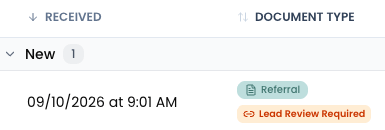
- In the fax queue. The fax shows an orange Lead Review Required label next to its Referral label.
How to review a second referral
- Open the lead from your lead dashboard.
- Open the Referral Information tab and read the new referral.
- Decide what the referral is:
- The same request you already have, or an updated version of it. Keep both referrals on the one lead and carry on working it.
- A separate request that needs its own evaluation. Create a second lead using the steps below.
- Not a referral at all. Go to the fax queue and mark the fax not a lead. The fax stays in your fax queue and you can classify it as something else, such as a records request.
How to create a separate lead from a second referral
In situations where a second referral is received for an already open lead, but requires its own separate course of care and therefore deserves its own separate lead, here's what to do:
- Open the fax and download it.
- Go to your lead dashboard and click + New Lead.
- Select Fax.
- Upload the fax you downloaded.
- Review the new lead. Second Door reads the fax and fills in what it can, so check the patient information and add anything that's missing.
If your practice does this often, consider turning automatic de-duplication off. Practices that get a lot of separate referrals for the same patient can spend more time splitting leads apart than the automation saves. With automatic de-duplication off in Settings > Task Automation, every referral creates its own lead and you link the duplicates yourself.
Marking a lead as a duplicate
- Click the ... menu in the top right of the lead card or the lead profile.
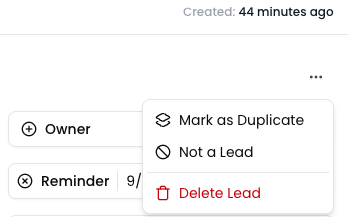
- Select the lead you want to link this one to from the list of similar people.
The duplicate lead drops off your lead dashboard, and its lead profile shows a banner with a link to the original lead. To separate the two leads again, click Not a Duplicate on that banner.
Marking a duplicate links the two leads. It doesn't merge them. Notes, calls, and documents stay on the lead they were added to. If you need a note or a document on the other lead, copy or upload it there yourself.
Finding leads that need attention
Two filters on your lead dashboard find these leads:
- Has Duplicates. Shows leads that have duplicate leads linked to them. These leads also show a banner. Click the eye icon on the banner to view the linked duplicates.
- Document Review Required. Shows leads with new referrals waiting for review.
Why a lead duplicated when you didn't expect it
The most common cause is a lead closed too early. Second Door won't link a new lead to a lead in Closed Lost unless the patient is in an active course of care. That's deliberate. When you close a lead as lost, you log a reason, and reopening that lead weeks later would undo the reason you logged.
If you're still working a lead, keep it in a status from your Open or In Progress groups. An on-hold status de-duplicates as long as it sits in one of those two groups. A lead you close as lost does not.