Filtering Your Leads
You can filter leads by the following dimensions by clicking the filter toggle at the top of your lead list (available in both kanban and table views):
- Sites (Digital Front Door Pages)
- Priority (urgent/high/medium/low)
- Source (where the lead came from)
- Owner
- Payers
- Referring Provider
- Marketing Source
- Scheduling Method (patient or staff scheduled)
There are also several Boolean filters available to make it easy to act quickly on patients requiring follow-up or intervention:
- Has unread comments
- Is past due
- Needs action (all leads with past due follow-ups or requiring attention today)
- Has duplicates
- Has unreplied messages
- Has unresolved conversations
You can also quickly update your lead views using the quick filters for leads Assigned to Me or Needs Action. Lastly, you can filter by practice location using the Locations button and checking the locations you'd like to focus on.
How Follow-Up Dates Work
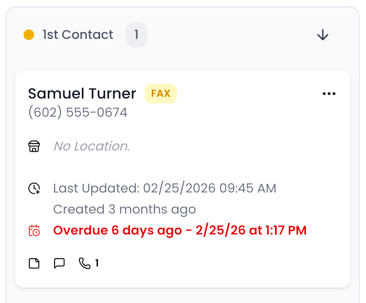
A follow-up date is a reminder to reconnect with a lead. It stays visible until completed or updated. Follow-up dates that are past due will show up in red to ensure they are worked ASAP.
Setting Automatic Follow-Up Rules
-
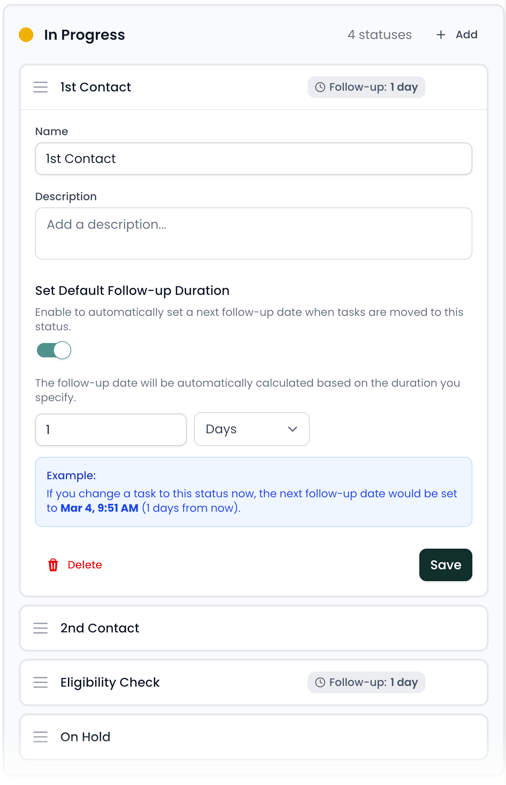
Go to Settings → Lead Statuses
-
Open any status
-
Assign a default follow-up duration (for example, +1 day after moving into “1st Contact”)
This ensures consistent follow-up patterns across your team.