
Once an employer opportunity is closed won, you create a partner and their record becomes the central place to manage:
-
Employer information
-
Eligible employees
-
Program activity
-
Billing and payments
-
Employer-specific program configuration
Partners allow your practice to manage the operational side of employer relationships after a deal has been finalized.
Partner Overview
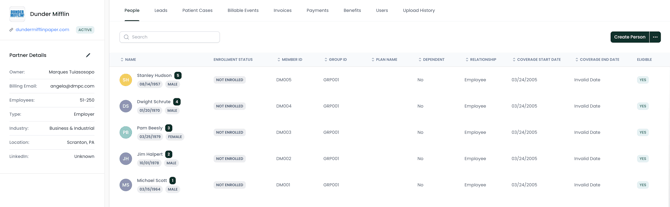
When you open a partner, you will see a sidebar with company details and a set of tabs used to manage different aspects of the relationship.
The sidebar contains general information about the employer, while the tabs provide access to operational data such as employee eligibility and program activity.
Partner Details
The sidebar contains core information about the employer partner.
Typical fields include:
-
Company name
-
Organization owner
-
Employee count
-
Industry
-
Company description
-
LinkedIn company page
-
Billing contact email
-
Location (city and state)
To update this information, click the pencil icon at the top of the sidebar.
Keeping this information up to date ensures accurate reporting and communication with the employer.
People
The People tab is used to manage individuals who are eligible for services through the employer program.
Employers typically provide an eligibility file containing their employee population. This file is uploaded into Second Door and automatically creates people within the partner portal.
For each person, you will see information such as:
-
Enrollment status
-
Member ID
-
Group ID
-
Relationship to the employee
-
Coverage start and end dates
-
Eligibility status
-
Contact information
Most organizations upload eligibility files in bulk, but you can also manually add individuals using the Create Person button.
Leads
The Leads tab tracks individuals who have entered the program through the employer’s Digital Front Door. These leads represent employees or dependents who have expressed interest in care through the employer program.
This section allows your team to monitor inbound activity from employer populations. For more details on Digital Front Door Sites, read this article.
Patient Cases
The Patient Cases tab tracks active care cases associated with the employer partner. This helps your team understand how many employees are currently receiving care and how those cases are progressing.
Billable Events
The Billable Events section records care activities that generate charges under the employer partnership agreement. These events form the basis for invoicing the employer partner.
Invoices
The Invoices tab tracks invoices generated for the employer partner based on billable events. This allows your organization to monitor charges submitted to the employer.
Payments
The Payments tab tracks payments received from the employer partner. This section helps reconcile invoices with received payments.
Benefits
The Benefits section stores information about the employer’s benefit structure for the program. This includes details about covered services or program eligibility rules.
Users
The Users tab lists individuals who have access to the employer’s partner portal. These users may include employer administrators or internal team members managing the partnership.
Upload History
The Upload History section tracks eligibility file uploads and other partner-related data imports. This helps administrators verify when eligibility data was uploaded and review previous files if needed.
Best Practices
To manage employer partnerships effectively:
-
Upload eligibility files regularly to keep employee records current
-
Review people enrollment status to ensure accurate eligibility
-
Monitor leads and patient cases to track program engagement
-
Review billable events and invoices to maintain accurate billing
Maintaining accurate partner records ensures your practice can operate employer programs smoothly and maintain transparency with employer clients.