
It is primarily used to search, filter, and access patient records.
Why This Matters
Patients is the main place to:
-
look up a specific patient
-
review activity across visits and communication
-
navigate into detailed patient records
- make updates to specific patient record details
It acts as the entry point for most patient-level workflows.
What You Can Do
From the Patients view, you can:
-
search by name or contact information
-
filter by provider or location
-
view primary location, provider, and payer
-
open a patient record
This makes it easy to quickly find and review patient information.
Patient Record Overview
From an individual patient record, you're able to view key information about the person at a glance:
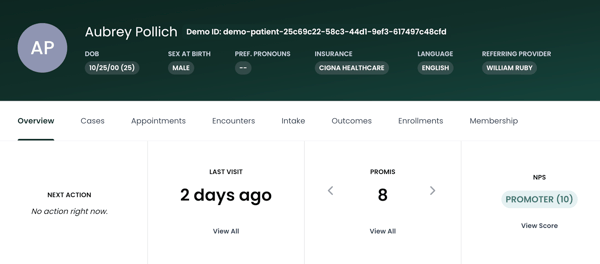
The top section provides a quick snapshot of who the patient is and how they are set up in the system. It includes contact details, primary location, primary provider, referring provider, and communication preferences.
The menu ribbon offers detail tables for cases, appointments, encounters, intake surveys, outcome surveys, enrollments, and any memberships associated to the patient.
This is typically the first place to check when confirming basic information or understanding how the patient entered care.
Upcoming Appointments
This section shows all scheduled visits, along with the provider, location, and visit type. You can toggle between upcoming and recent appointments depending on what you need to review.
It’s most useful when preparing for an upcoming visit or verifying what has already occurred.
Insurance Information
This section displays the patient’s payer and coverage details. While not heavily interacted with in day-to-day workflows, it provides helpful context when reviewing a patient’s case or filtering data elsewhere in the platform.
Care Team
The Care Team section shows who is involved in the patient’s care, including both the primary provider and referring provider.
This helps clarify ownership and is especially useful when multiple providers are involved.
Recent Activity
Recent Activity provides a timeline of everything that has happened with the patient. This includes appointments being created, encounters being opened or closed, and communication events like emails being sent, dropped, or bounced.
Activity reflects both care events and communication, so it’s useful for debugging issues like missed messages or scheduling confusion. Communication opt-in status also plays a role in what outreach the patient can receive, which can explain gaps in messaging if something looks off.
How It’s Used
Most teams use the patient record to quickly understand what’s going on with a patient without needing to check multiple systems. It’s commonly used to confirm upcoming visits, review communication history, and validate referral or provider information.
Because this view pulls together both clinical activity and messaging activity, it serves as the most complete picture of the patient within Second Door.