
A provider record is important because it helps determine:
-
where a provider can be scheduled
-
what types of appointments they can see
-
whether they are available through Digital Front Door scheduling
-
what times they are actually bookable
If provider setup is incomplete or inaccurate, it can affect self-scheduling, appointment requests, provider-driven routing, and schedule visibility.
Why provider setup matters
Providers are one of the core building blocks of scheduling in Second Door. For example, provider setup helps answer questions like:
-
Can this person appear as a scheduling option?
-
Which clinic locations do they work at?
-
What services can patients book with them?
-
When are they actually available to be seen?
This is especially important for organizations using:
-
provider-driven routing
-
self-scheduling
- Digital Front Door and booking rules
A provider may exist in the system, but if their locations, services, or availability are not set correctly, they may not behave the way your team expects.
Provider Details
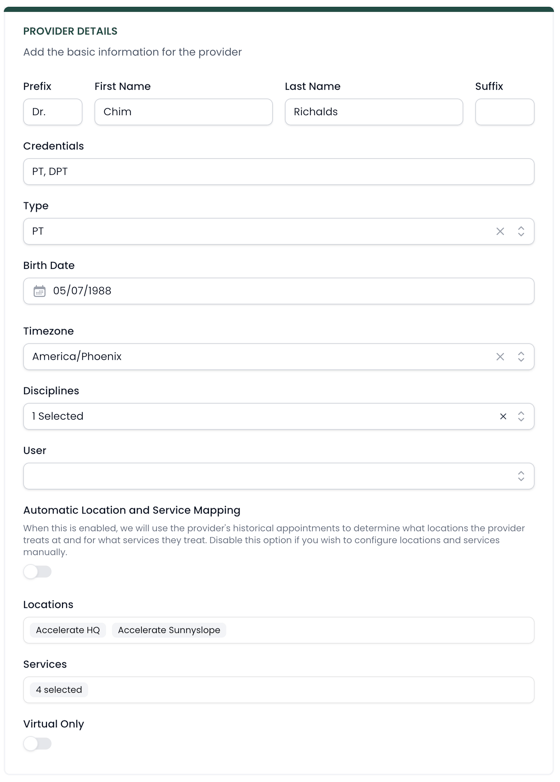
Each provider record includes general information about that individual, along with settings that affect how they can be used across the platform.
Disciplines
This is used to specialize types of visits offered based on Digital Front Door routing and triage. This helps you pair certain types of treatment with specific providers (like OT, SLP, Hand Therapy, Women's Health, etc.)
Locations
This determines where the provider works. A provider can be assigned to one or more clinic locations.
This matters because availability is location-specific. If a provider treats at multiple clinics, their schedule and availability need to be configured for each one.
Services
Services determine what types of appointments can be booked with that provider.
This is one of the most important parts of provider setup. A provider should only be assigned services they can actually perform.
For example:
-
a PT may be assigned initial evaluations and follow-ups
-
a PTA may only be assigned follow-up visits
-
a provider offering a specialty service may need that service specifically assigned (like dry needling, neuro, etc.)
If services are not configured correctly, the wrong appointment types may appear as bookable.
Note: you can toggle Automatic Location and Service Mapping here as well. When this is enabled, Second Door will use the provider's historical appointments to determine what locations the provider treats at and for what services they treat.
Self-Scheduling
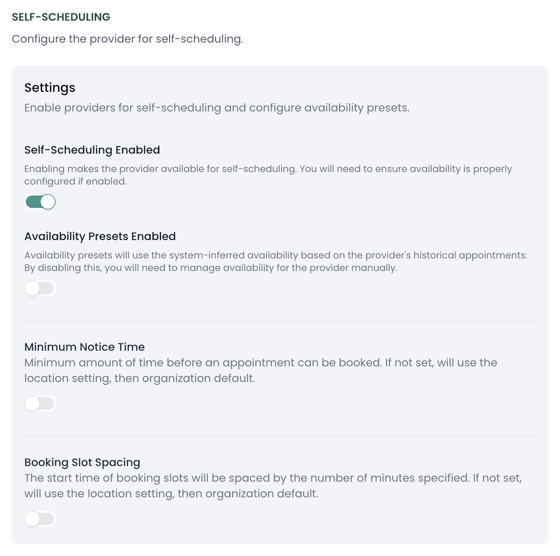
This section offers controls that are used in Digital Front Door scheduling.
Self-Scheduling Enabled
Allows the provider to be booked through Digital Front Door.
Only enable this if:
-
availability is accurate
-
services are correctly assigned
Otherwise, patients may see incorrect booking options.
Availability Presets Enabled
Uses system-inferred availability based on historical schedules.
-
On → less manual setup, less control
-
Off → manual setup, more precise
Use presets only if schedules are consistent.
Minimum Notice Time
Defines how far in advance an appointment must be booked.
Example:
-
2 hours → allows near-term bookings with enough time to prepare
-
24 hours → prevents same-day bookings
Falls back to location or organization settings if not set.
Booking Slot Spacing
Controls when appointments can start (not duration).
Example:
-
15 minutes → :00, :15, :30, :45
-
30 minutes → :00, :30
Falls back to location or organization settings if not set.
Availability
Availability defines when a provider is actually bookable.
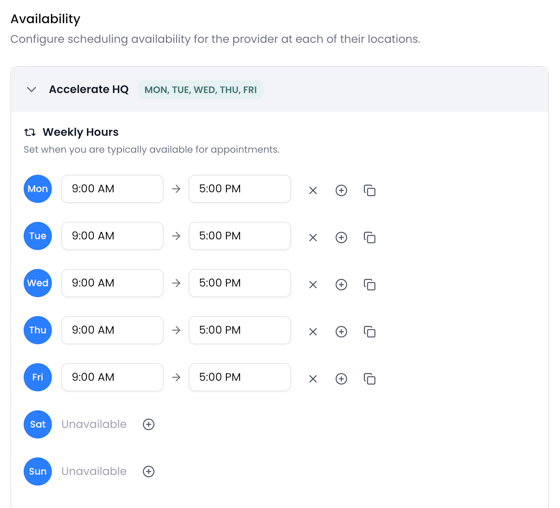
This is not just a general statement of working hours. It should reflect the real appointment windows when patients can be scheduled.
For example, if a provider works:
-
10:00 AM to 12:30 PM
-
then 2:00 PM to 3:30 PM
That availability should be entered exactly that way. It should not be entered as one large block from 10:00 AM to 3:30 PM if the provider is unavailable in the middle of the day.
This is important because Second Door uses provider availability to determine whether a patient can be booked.
Availability by Location
Availability is tied to both the provider and the clinic location.
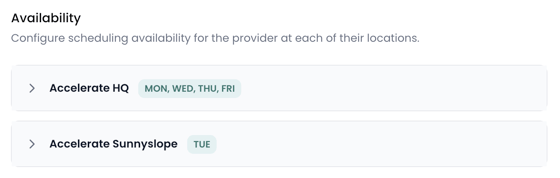
If a provider works at more than one clinic, each location can have its own availability settings.
That allows organizations to reflect real-world schedules, such as:
-
a provider who works Mondays and Wednesdays at Clinic A
-
and Tuesdays and Thursdays at Clinic B
Each location should be reviewed separately.
Availability Overrides
Providers can also have availability overrides.
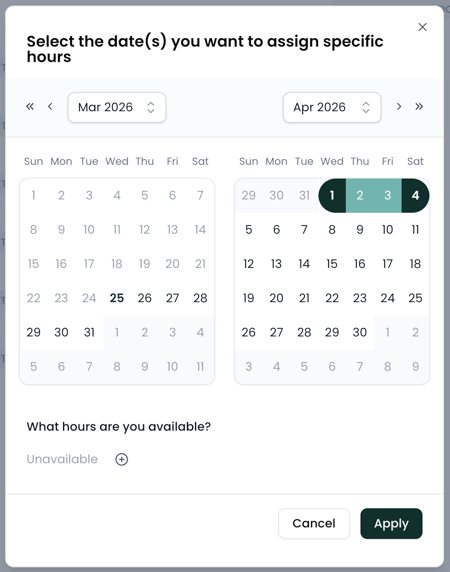
Overrides are useful for temporary schedule changes, such as:
-
PTO
-
holidays
-
training days
-
temporary coverage changes
If a provider will be unavailable for a period of time, that should be reflected in their availability settings using overrides where appropriate.
This is especially important for organizations using online scheduling or appointment requests, since the system will continue to use the availability it sees.
Important Note about Schedule Blocks
One important operational note: non-patient blocks in your EMR's schedule may not automatically override availability in Second Door.
For example, if a provider creates time in the EMR for things like documentation, marketing. or internal meetings, that does not necessarily mean Second Door will stop offering that time as bookable.
If a provider should not be bookable during a specific period, their availability in Second Door should reflect that directly.
This is a common source of confusion, so it is worth checking carefully during setup and as schedules shift over time.
Creating a New Provider
Click the + New Provider button at the top of the page. When creating a new provider, you are essentially filling in the same fields described above.
The most important thing is not just creating the record, but making sure the provider is configured in a way that matches how they actually work.
A provider with incomplete setup may appear in the system but not function correctly for scheduling.
Setup Best Practices
When reviewing provider setup, focus on these areas first:
-
Confirm locations: Make sure the provider is assigned to every clinic where they actually treat.
-
Review services carefully: Only assign services that the provider should truly be bookable for.
-
Check scheduling enabled: If the provider should appear in Digital Front Door workflows, make sure this setting is turned on.
-
Be precise with availability: Do not use broad time blocks if the provider has lunch breaks, partial availability, or recurring gaps.
-
Use overrides for temporary schedule changes: If the provider is out or unavailable, update Second Door so the schedule reflects reality.
Related setup areas
Provider setup works closely with:
-
Services
-
Schedule
If something looks wrong in scheduling, those are the first related areas to review.