
While booking rules define what restrictions exist, scopes allow you to target those rules to specific providers, locations, services, or patient types. Scopes give booking rules their flexibility. Without scopes, a rule would apply to every appointment across your entire organization.
By using scopes, you can create rules that apply only to the specific scenarios you care about.
How Scopes Work
Scopes act as filters that determine when a booking rule should be applied.
When someone attempts to schedule an appointment, the system checks whether the appointment matches the rule’s scope. If it does, the booking rule is evaluated.
If the appointment does not match the scope, the rule is ignored.
This allows your clinic to create targeted scheduling policies without affecting unrelated appointments.
Common Scope Types
Scopes can target several parts of the scheduling system, including:
Provider
Apply a rule only to a specific provider.
Example: Limit evaluations for one provider who specializes in complex cases.
Location
Apply a rule to a specific clinic location.
Example: Prevent double booking at a clinic with limited treatment rooms.
Service
Apply a rule to a specific service type.
Example: Prevent double booking for initial evaluations.
Payer
Apply a rule to patients with a specific insurance plan.
Example: Limit a certain payer to a percentage of scheduled visits.
Combining Scopes
Scopes can be combined to create even more precise rules. For example, you could create a rule that prevents double booking for:
-
Medicare patients
-
Initial evaluations
-
At a specific clinic location
When multiple scopes are applied, the rule only triggers when all scope conditions are met (AND logic).
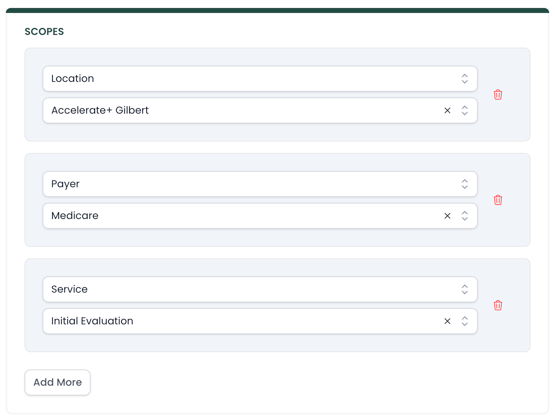
This allows clinics to build detailed scheduling policies that match their operational needs.
Rule Specificity
When multiple booking rules could apply to the same appointment, the system evaluates the most specific rule.
For example:
-
One rule may apply to an entire clinic location
-
Another rule may apply to a specific provider at that location
If an appointment is scheduled with that provider, the system will apply the provider-specific rule, since it is more precise.
This ensures that targeted scheduling rules override broader ones when necessary.
Best Practices
When configuring scopes:
-
Start with broad rules and refine them as needed
-
Use scopes to avoid unnecessary scheduling restrictions
-
Keep rule logic as simple as possible to maintain clarity
Scopes allow you to build flexible scheduling policies while maintaining control over how appointments are booked.