
They determine what patients can request or self-schedule, and which providers those appointments can be booked with.
Why Services Matter
Services sit at the center of scheduling. They control:
-
what appointment types are available
-
how long appointments are
-
which providers can perform them
If services are set up incorrectly, patients may:
-
see the wrong options
-
book the wrong visit type
-
or be blocked from booking altogether
What a Service Includes
Each service defines how a specific appointment should be scheduled and delivered.
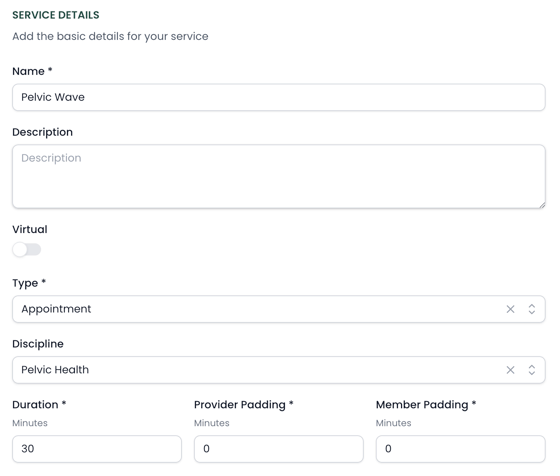
Name
The appointment type (e.g., Initial Evaluation, Follow-Up, Pelvic Health Visit).
Description
Optional, but useful for internal clarity or future patient-facing context.
Type
Defines how the system treats the visit (e.g., appointment vs non-patient).
Discipline
Indicates the specialty area (e.g., Physical Therapy, Pelvic Health). This helps with routing, filtering, and organizing services.
Virtual
Determines whether the service can be delivered virtually.
Duration
The length of the appointment itself.
Provider Padding
Additional time before or after the appointment for the provider (e.g., documentation, prep time).
Member Padding
Additional buffer time for the patient between appointments.
Together, these settings control not just what the appointment is called, but how it fits into the schedule and how it can be booked.
How Services Are Used
Services are assigned to providers. This determines what a provider can be booked for.
Example:
-
A PT → Evaluation + Follow-Up
-
A PTA → Follow-Up only
-
A hand specialist → Only hand therapy visits
If a service is not assigned to a provider, it cannot be booked with them. Services also feed into Consumer Direct and can be used for cash pay & subscription visits. More on that here.
Common Use Cases
Services can represent more than just standard visits, such as:
-
Free screens
-
Specialty programs (e.g., pelvic health, hand therapy)
-
Cash-pay or wellness offerings
-
Personal training or fitness programs
This allows organizations to expand beyond traditional visit types.
Best Practices
-
Keep service names clear and consistent
-
Only assign services providers can actually perform
-
Review durations carefully—this impacts your scheduling flow
-
Use services to reflect real operational differences (not just labels)