
If your user invite has expired, reach out to your account admin to have them resend the invite link. Second Door Support is also able to resend invitations if they are unavailable.
Resending Invitations (Account Admins Only)
To resend an invitation to a previously invited user that has expired, click the ... at the end of their name row in Settings > Organization > Users, then click Resend Invitation.
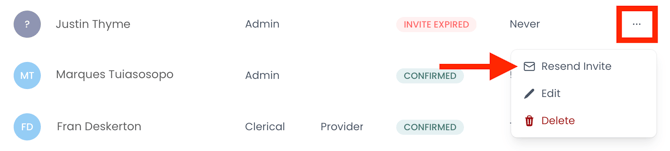
A new invitation will be sent immediately. Users will have 7 days to accept the invitation and create a user account. Once completed, you'll see the user's status as Confirmed.