
These settings allow you to bypass rules in urgent situations or relax restrictions when schedules are not yet full. These settings are available on all Booking Rules.
High Priority Overrides
Some patients may need to be scheduled quickly, even if they would normally violate a booking rule.
The Skip for High Priority setting allows the system to bypass a rule when a patient has been marked as high priority.

High priority status is typically assigned during Digital Front Door lead management processes.
For example, a patient with an urgent vestibular condition may need to be scheduled immediately. Even if a case mix rule would normally prevent booking, the rule can be skipped so the patient can be seen quickly.
This ensures that clinical urgency can take priority over scheduling restrictions when necessary.
Valid Until (Time-Based Exceptions)
The Valid Until setting allows booking rules to relax when appointments are close in time.
This helps prevent situations where strict scheduling rules leave unused time on the schedule that could otherwise be filled.
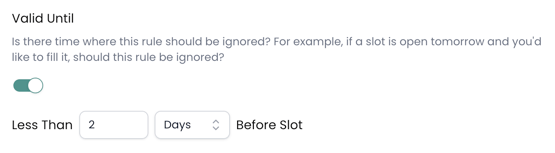
For example, a clinic may normally restrict certain appointment types, but if there are still open slots within the next couple of days, it may be better to fill those appointments rather than leave the time unused.
Using the Valid Until setting allows you to specify a time window where the rule will no longer apply. This allows schedules to remain balanced while still ensuring open time can be filled when needed.
Example: If the rule is set to Valid Until 2 days, the rule will be ignored for appointment slots occurring within the next two days.
When to Use Advanced Settings
Advanced rule settings are most useful when your clinic wants to maintain scheduling guidelines while still allowing flexibility in certain situations.
These settings are commonly used to:
-
Prioritize urgent patient needs
-
Prevent empty appointment slots near-term
-
Maintain scheduling flexibility without removing rules entirely
Using advanced settings thoughtfully helps ensure booking rules support your operational goals without creating unnecessary barriers to scheduling.