
Unlike count rules, which limit the number of appointments, case mix rules limit the proportion of the schedule that can be taken up by certain appointment types.
This helps clinics maintain a balanced schedule and ensure that certain visits do not dominate available appointment time.
How Case Mix Rules Work
Case mix rules define a maximum percentage of appointments that can belong to a specific category.
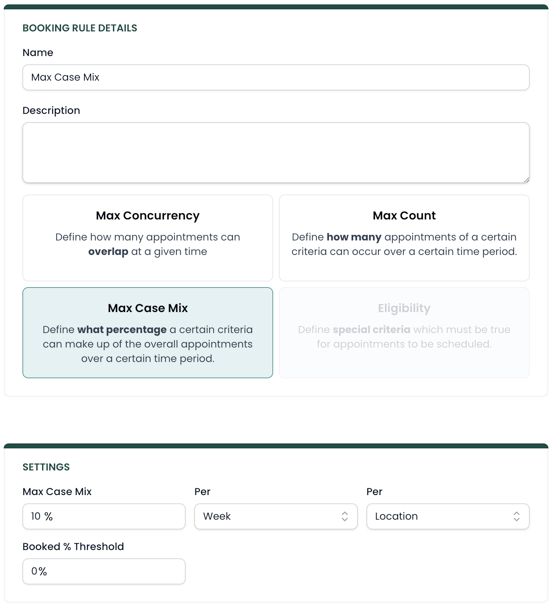
For example, a clinic might want to limit:
-
Follow-up visits to 80% of the schedule
-
A specific insurance payer to 10% of total appointments
-
A specialty service to a portion of available time
When scheduling an appointment, the system evaluates whether booking that visit would cause the schedule to exceed the allowed percentage.
If it would exceed the limit, the appointment will not be allowed.
Case Mix Threshold
Case mix rules also include a Booked Threshold, which determines when the rule begins to apply.
This prevents case mix rules from triggering too early when only a few appointments have been scheduled.
For example: If a provider has ten available appointment slots but only one appointment is booked, applying case mix rules immediately could incorrectly block scheduling.
The threshold allows the system to wait until a certain portion of the schedule is filled before enforcing the case mix rule. This helps ensure the rule supports scheduling balance without restricting availability too early.
Common Use Cases
Case mix rules are often used to manage payer balance and service distribution.
Examples include:
Controlling payer concentration
A clinic may want to ensure that a single payer does not dominate the schedule.
Protecting evaluation availability
Follow-up visits can easily fill a schedule if left unrestricted.
Example rule: Limit follow-up visits to 80% of the schedule to ensure room for new evaluations.
Managing specialty services
Certain services may require specific providers or equipment.
Example rule: Limit pelvic health visits to a portion of a provider’s schedule.
Using Scopes with Case Mix Rules
Case mix rules can be applied using scopes, which allow you to target the rule to specific parts of your organization.
Scopes may include:
-
A specific provider
-
A clinic location
-
A service type
-
A payer or insurance group
Scopes can also be combined to create more targeted rules. For example, you might limit a certain payer’s visits only at a specific clinic location or only for a specific service line.
Advanced Settings
All booking rules contain two advanced settings called Skip and Valid Until. Read more on how those are used in this article.