
Rather than relying only on personal networks or cold outreach, Discover allows you to search a large database of companies and identify potential opportunities that match your clinic’s location and the power of your entire teams' network.
Discover uses ZoomInfo's industry-leading employer data to populate information information like company size, revenue, industry, and location.
From Discover, you can:
-
Search for employers in your area
-
Filter companies based on size, location, or industry
-
Create Employer Opportunities
-
Create Opportunity Reviews to gather introductions from your team
Discover is typically the starting point for structured employer prospecting.
Filtering Employer Searches
Discover provides several filters to help narrow your search and identify companies that match your target criteria.
Common filters include:
Location Filters (State, ZIP code, Search radius from the selected clinic location)
Company Filters (Company name
-
Number of employees
-
Annual revenue
Industry Filters
You can filter for specific industries or use keywords to identify companies operating in particular sectors.
Active in the Last Year
This toggle helps filter out companies that may no longer be operating, reducing outdated search results.
Once you apply your filters, select Search to generate a list of companies that match your criteria.
Understanding Search Results
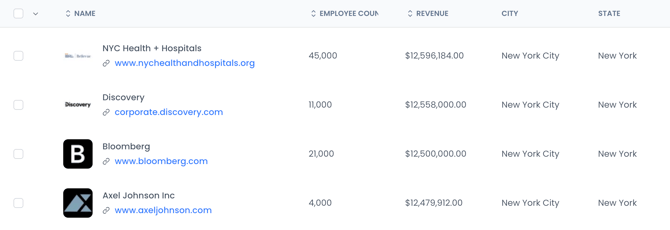
Search results display key employer details pulled from ZoomInfo.
Typical information includes:
-
Company name and website domain
-
Employee count
-
Estimated annual revenue
-
City and state
This information helps you quickly evaluate whether a company may be a good fit for employer partnership outreach.
Creating Opportunities
When you find companies you want to pursue, select the checkbox next to each company and choose Create Opportunities.
You will then be prompted to choose one of two actions:
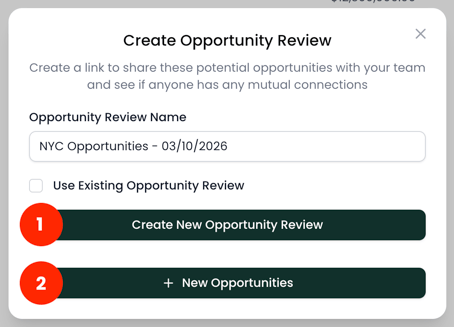
1. Create an Opportunity Review: adds the selected companies to an Opportunity Review so your team can help identify potential introductions before outreach begins.
Note: you can also add the selected companies to an existing Opportunity Review if one already exists by checking the box and searching for an existing review.
2. Create Opportunities: creates Employer Opportunities directly so your team can begin outreach.
How Discover Fits into the Workflow
Discover helps your team move from identifying companies to pursuing real partnerships.
A typical workflow looks like this:
-
Search for companies using Discover
-
Select promising employers
-
Add them to an Opportunity Review
-
Share the Opportunity Review with your team to identify connections
-
Convert strong opportunities into Employer Opportunities for outreach
This process allows your practice to identify potential employer partners more efficiently and prioritize outreach where you have the strongest connections.