
The Lead Dashboard is the command center for everything related to incoming patient opportunities. It centralizes all leads—web, phone, fax, and referrals—in a simple, visual layout that helps your team stay organized and responsive.
This article describes navigation and features of the Lead Dashboard. For our companion Workflow Guide, click here.
What You’ll See When You Log In
-
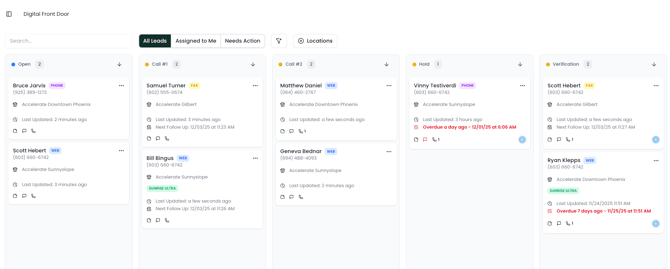
A dashboard organized into columns, with each column representing a lead status.
-
A search bar at the top for quickly finding patients or leads.
-
A calendar icon for accessing your schedule.
-
A board of lead cards, each representing a single patient lead.
About Lead Cards
Each card displays key details:
-
Patient name
-
Contact information
-
Associated location
-
Status
-
Owner
-
Follow-up date (if assigned)
Clicking a card opens the full lead profile.
Updating Leads from the Dashboard View
You can quickly update lead cards using the dropdown menu by clicking the ... in the top right:
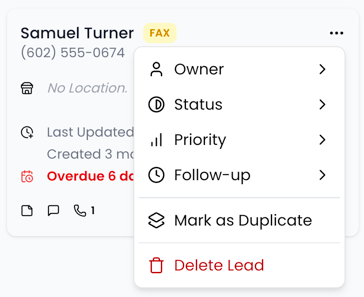
This menu allows you to make quick updates to a lead's owner, status, or priority. It also gives you the ability to quickly schedule a follow up, mark a lead as a duplicate, or delete the lead.