
Sites is where you'll see all the instances of your Digital Front Door links in one place, along with a quick summary of total leads from each link, the type of link, and a URL for the page.
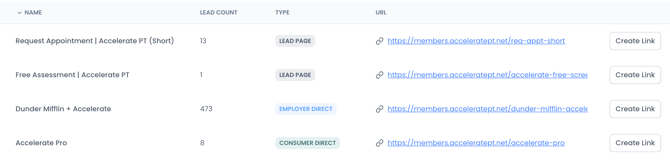
The Type is determined by the function of the Site—if you are using Consumer Direct or Employer Direct, you'll see that indicated.
Creating Links & UTMs
To create a specific tracking link for your site, click the Create Link button. Here, you'll be able to add tracking parameters to the link and easily copy the link for use. Some examples of where you may want to create specific links:
- In a QR code used on a sign at a community event (tracking Source as the event you attended)
- In a Facebook ad campaign (tracking Source as Facebook, Medium as PPC, and including Campaign, Term, Content specifics to track variants)
For more details on UTMs and examples of how to use them, check out our article on UTM tracking.
Note: UTM data feeds into your Lead Dashboard and Reporting to give you full visibility across your marketing efforts.