
Second Door's Role in your clinic
Second Door's Digital Front Door centralizes every new patient lead (fax, web, phone, walk-in, or Petey) into one dashboard that your whole team can see. Every inquiry is captured, every contact attempt is logged, and every lead moves through a clear pipeline from first touch to booked eval.
This centralization also gives your practice visibility into your new patient pipeline. With Second Door, you can answer questions like:
- How quickly is your team reaching out to new leads after they come in?
- Where do most of your leads come from: fax, web, phone, or Petey?
- What percentage of leads convert to booked evaluations?
- When patients don't book, why not? Did they go elsewhere, choose not to pursue care, or simply never get called back?
- Which locations or team members are converting leads most effectively?
This data helps your practice spot where leads are falling off and make informed decisions about staffing, follow-up processes, and growth.
Simplified workflow example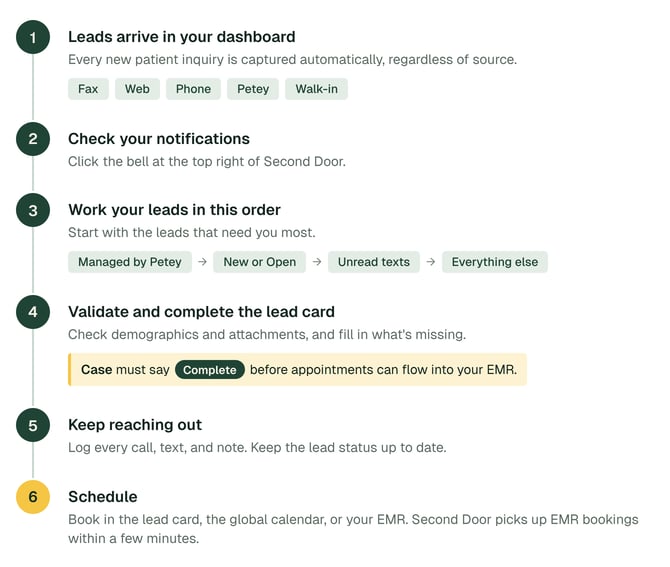
Not every practice has all of these channels active. The daily workflow below applies regardless of which combination you use. The only difference is which types of leads appear in your "New" column each morning.
Your daily lead management routine with Second Door
Each morning, a team member opens the Second Door dashboard and works through the leads that came in since their last check. Speed to contact is the single biggest driver of whether a lead converts to a booked appointment.
- Open your Second Door dashboard. Go to app.seconddoorhealth.com and make sure your default location is set. Bookmark this page for quick daily access.
- Check your notifications: Click bell at the top right of Second Door. Read more about notifications here.
- Work your leads - we recommend this order:
- If using Petey, start with Petey leads.
- Click the "Managed by Petey" button to filter down to leads Petey created since your last check.
- Did Petey complete the booking?
- Yes: Validate step 4 below, then follow up with the patient to confirm their appointment, collect any additional information required and initiate your internal new patient intake workflow.
- No: Review her call or SMS transcript, then pick up where Petey left off at step 4 below.
- See the Petey Workflow Guide for more information.
- "New" or "Open" column. These are fax referrals, web requests, and phone inquiries that arrived since your last check. These are prospective patients waiting to hear back, so reach out quickly!
- Leads with unread texts. These will have a number on their SMS icon on their lead card; these are patients who may require responses.
- Everything else - including leads with reminders due today or prior, leads who Need Action (use the pre-filtered Needs Action view), or leads who haven't been touched in a while.
- If using Petey, start with Petey leads.
- Validate and complete lead details as needed.
- Demographics: Check the patient name, date of birth, phone number, address, and any field with a ⚠️ icon. Missing or invalid phone numbers or emails could negatively impact downstream workflows.
- If this patient isn't a lead or is a duplicate, click the 3-button menu to the right of the patient's name and mark as appropriate. Fax leads that are declassified as Referrals can be found in the Fax inbox and will be removed from your dashboard.
- Review Attachments:
- Fax leads will always have attachments to review. If your webform offers the ability to upload attachments, you'll find them here too. Click the paper icon at the top left of the lead, and use the drop-down to navigate between attachments if there are multiple.
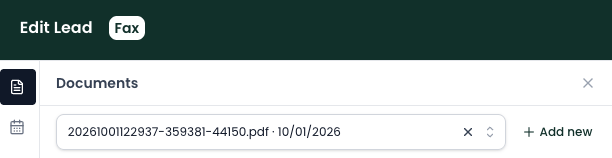
- Download each attachment and upload in their EMR chart as needed.
- Fax leads will always have attachments to review. If your webform offers the ability to upload attachments, you'll find them here too. Click the paper icon at the top left of the lead, and use the drop-down to navigate between attachments if there are multiple.
- Triage: This will only be pre-filled for web leads (if you have required triage steps as part of your Second Door webform). You can choose to manually fill out your Triage questions by clicking Add triage.
- Insurance: This is optional in Second Door. If you text the patient and request an image of their insurance card, this section auto-populates.
- Case: This section must say
 before appointments can successfully flow into your EMR. Open the case and you'll have these two options:
- Existing Patients: If we detect existing cases in your EMR for this patient, click Select Existing to decide if you want to link it to an existing case in the EMR.
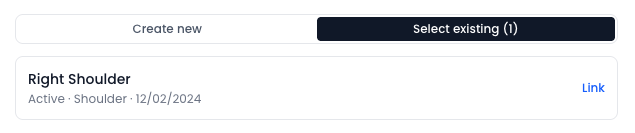
- Otherwise, you'll just proceed to Create new case.
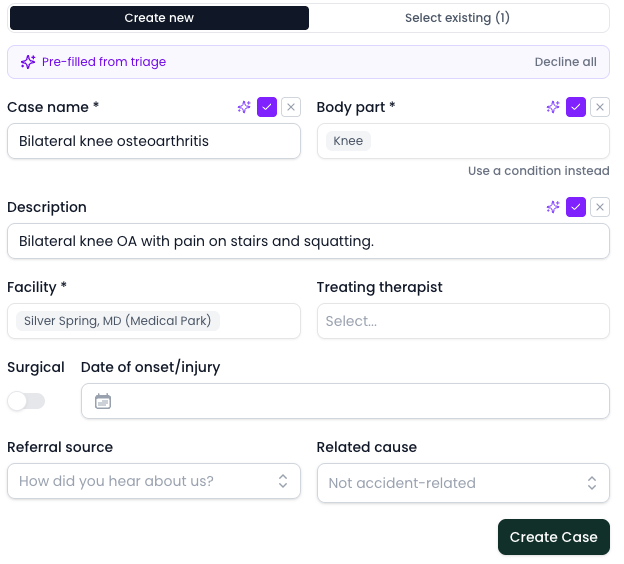
- Existing Patients: If we detect existing cases in your EMR for this patient, click Select Existing to decide if you want to link it to an existing case in the EMR.
- Scheduling: If the patient self-scheduled online or via Petey, this will already be populated. If not, you can choose to schedule here, through the global calendar at the top right of Second Door
 , or in your EMR. If you schedule via your EMR, this area populates automatically by reading your EMR.
 - Referral: This will be pre-populated for fax leads. While optional, filling this out contributes to more reliable lead reporting.
- Marketing: Web leads will come in with these fields pre-populated if you are asking for a marketing source in your webform or using UTM links. Learn more here.
- Demographics: Check the patient name, date of birth, phone number, address, and any field with a ⚠️ icon. Missing or invalid phone numbers or emails could negatively impact downstream workflows.
- Continue reaching out.
- Log your efforts: calls, communications and internal notes using the Call Log and Note functions on the lead cards.
- Keep statuses updated: Update the lead status as you go. Drag the lead card to the appropriate column ("New" to "1st Contact" to "Scheduling") - or update the status drop-down inside the lead card so your team can see progress at a glance. Task Automations act as a fallback if your team forgets to update a status.
- Schedule: There are multiple ways to schedule appointments:
- In the Lead Card.
- Through the global calendar at the top right of Second Door
- In your EMR. If you schedule via your EMR, Second Door will know and update your lead accordingly within a few minutes. Remember - your Second Door booking rules don't apply unless you book via Second Door.