
While availability defines when a provider is working, booking rules define what can be scheduled during that time.
These rules allow your clinic to enforce scheduling policies automatically. Instead of staff needing to remember every scheduling guideline, the system checks the rules and determines whether a specific appointment can be booked.
Booking rules help clinics manage things like:
-
Double booking policies
-
Limits on certain appointment types
-
Insurance case mix
-
Evaluation capacity
-
Provider workload balance
When someone attempts to book an appointment, the system evaluates the booking rules and determines whether that appointment is allowed.
Types of Booking Rules
Second Door currently supports three primary types of booking rules:
Concurrency Rules
Concurrency Rules control how many appointments can overlap at the same time.
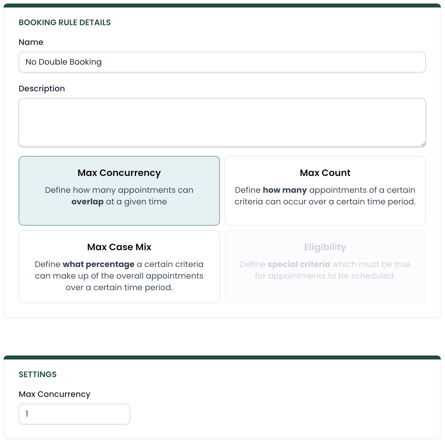
For example, you might:
-
Prevent double booking entirely
-
Allow double booking but not triple booking
-
Restrict overlapping appointments for certain patients
Concurrency rules define how much appointment overlap is allowed.
Count Rules
Count Rules limit how many times something can occur within a time period.
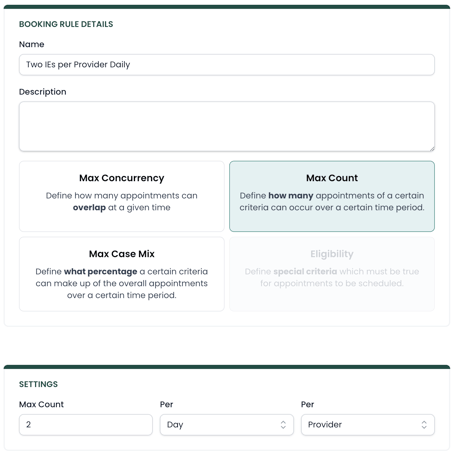
For example, a clinic might want to:
-
Limit initial evaluations to two per provider per day
-
Limit free screens to five per week
-
Limit certain specialty visits
Count rules track how many times something has occurred and prevent scheduling once the limit is reached.
Case Mix Rules
Case Mix Rules limit the percentage of a schedule that can be a certain type of visit.
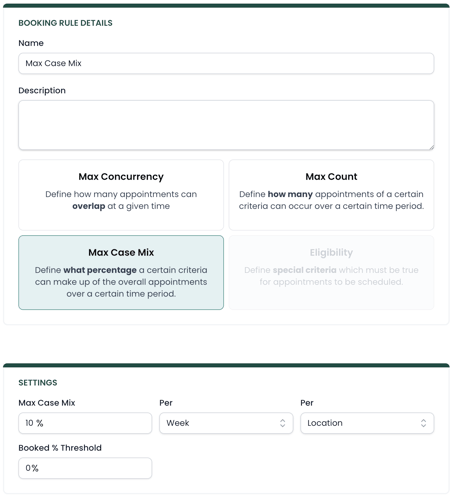
Instead of using a fixed number like count rules, case mix rules use percentages.
For example, you might want to:
-
Limit follow-up visits to 80% of the schedule
-
Limit a specific insurance type to 10% of visits
-
Limit a specialty service to a portion of available time
Case mix rules help ensure your schedule stays balanced.
Note: Booked % threshold allows to you bypass these rules if your schedule is below a visit minimum. For example, if you have 50 open slots per week, a booked threshold of 20%, and 8 visits on the calendar already, this rule would not apply until 10 visits are scheduled. This helps prevent you from artificially limiting your schedule when you have plenty of availability.
How Booking Rules Are Applied
Booking rules can be targeted to specific parts of your practice using scopes.
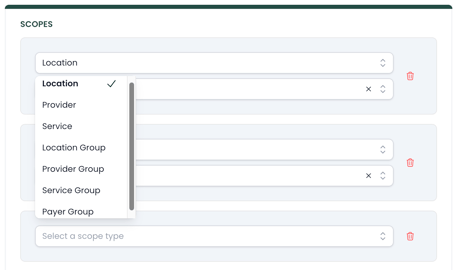
Scopes allow you to apply rules to things like:
-
A specific clinic location
-
A specific provider
-
A particular service type
-
A payer or insurance group
Scopes can also be combined to create more specific rules.
For example, you could create a rule that prevents double booking for:
-
Medicare patients
-
Initial evaluations
-
At a specific clinic location
This flexibility allows clinics to create scheduling policies that match their operational needs.
Using Advanced Settings
All booking rules contain two advanced settings called Skip and Valid Until. Read more on how those are used in this article.